Token anxiety and Don Nelson's harness v1.0
Day 14 / 60
New week in Don Nelson's challenge: a CEN-approved study.
Last week I didn't make much technical progress. And I think that's the most important thing I have to share today.
Token anxiety and AI psychosis
Last week I didn't make much progress. And that cost me more than it should have.
I'm a workaholic, that's nothing new. But since I started working with AI agents there's something different: the feeling that you can always do more, that if you're not running experiments or burning tokens you're wasting potential. The model is always available. There's no excuse to stop.
Turns out Andrej Karpathy put a name to this a few days ago on the No Priors podcast: "I get nervous when I have subscription left over." He called it token anxiety. I had been living it without knowing how to describe it.
I decided to slow down consciously. Not because there wasn't work to do — there always is — but because it was taking its toll. I think it's important to say this on a blog about building in public: AI amplifies your capacity to do, but if you don't manage that, it also amplifies burnout.
What did become clear this week: the bottleneck is no longer writing code. It's knowing how to direct well. Karpathy calls it a "skill issue" — whoever can decompose tasks precisely and review outputs efficiently wins, regardless of pure technical ability. That feels like both an opportunity and a new responsibility.
The No Priors episode with Karpathy, if you want to listen:
Where Don Nelson stands
Despite the slower week, the universe helped me unblock the two things that were holding me back the most.
I have a real case study. A concrete scenario letter requesting a power flow study and a bus capacity study.
I have access to two DIgSILENT licenses. A network license and a commercial one with no bus limits, which means I can now run power flows properly, without the restrictions that were slowing me down before.
Now it's all on me to push forward.
Don Nelson's Harness v1.0
(Is it really v1.0? Technically it never made it to production in its previous form, so yes.)
In the Day 4 post I talked about the harness concept in general. Today I want to talk about Nelson's actual harness — how it's built and why it was set up this way.
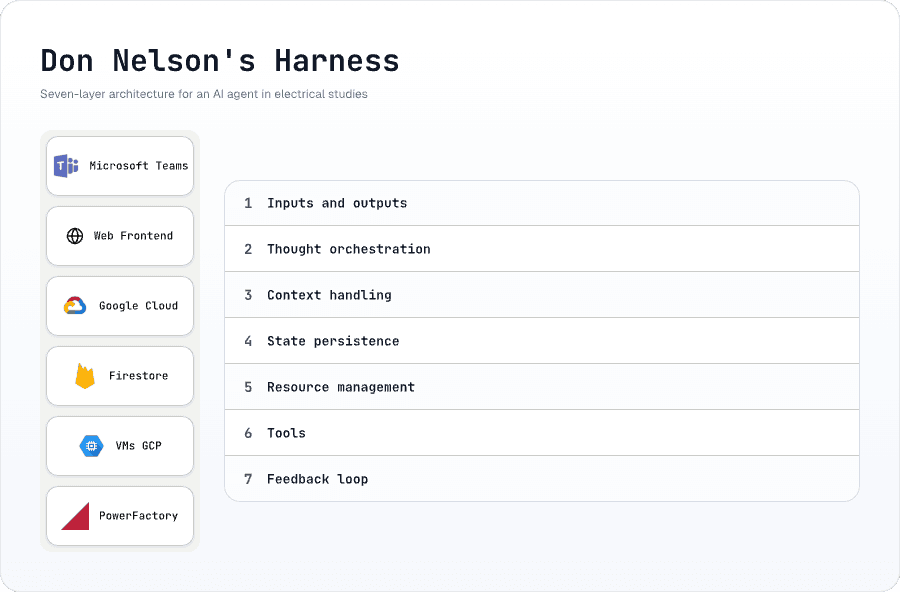
Don Nelson's Harness v1.0
1. Inputs and outputs
Nelson doesn't live in a single interface. It has a gateway that receives messages from Microsoft Teams or from the web frontend, normalizes them, and delivers them to the agent. The response goes back the same way. The agent never knows if it was spoken to by a user in Teams or someone in the browser.
2. Thought orchestration
Nelson has a 3-speed router:
- Direct (~1 second): For simple questions, greetings, meta-questions. No tools.
- ReAct (~5-15 seconds): A loop where the agent reasons, picks a tool, executes it, sees the result, and decides if it needs to do more.
- Plan-Execute (~20-60 seconds): For complex tasks. The agent first generates a plan with tasks, then an executor resolves them one by one — or in parallel if VMs are available.
The classifier is a two-phase system: first heuristics (if the message says "hello", go direct), then the model evaluates complexity if heuristics don't match.
For electrical studies, almost everything falls into Plan-Execute. The agent decomposes "analyze substation Codegua" into 5-10 subtasks, each with specific tools.
3. Context management
The model has a context limit. I can't feed it all 58 tools with their descriptions, plus conversation history, plus instructions for each analysis type. It doesn't fit — and even if it did, the model gets confused.
So the harness filters. When the executor receives a task:
- Detects which skills are relevant (by keywords in the message)
- Injects only those specific prompts
- Filters tools from 58 down to ~10-15 per task
- Truncates conversation history to avoid context bloat
Each skill is a module with its own system prompt. The DIgSILENT Core one tells the agent how to run power flows. The protections one explains what relays exist. The reports one teaches it to generate PDFs.
The analogy: it's like giving a junior engineer only the manuals they need for the day's task, instead of the whole shelf of standards at once.
4. State persistence
If Nelson deactivates a transmission line to simulate a contingency, the next power flow has to see that line as deactivated. But the .pfd file gets downloaded fresh every time.
The solution: an "overrides" system in Firestore. Every time Nelson modifies an element — deactivates a line, changes a transformer tap, adjusts a generator's power — that gets recorded. When the next tool executes, it passes those overrides to the Python backend, which applies them before running any calculation.
It's like a state layer that lives on top of the PowerFactory model. Not elegant, but it works.
5. Resource management
Nelson has a pool of VMs on Google Cloud, each with PowerFactory installed and a Python backend exposing a REST API.
The harness manages this with a reservation system in Firestore:
- Before executing a tool that needs PowerFactory, the system looks for an available VM
- Runs a health check (are you alive?)
- Reserves it with an atomic transaction — to avoid race conditions if two tasks request a VM simultaneously
- When the tool finishes, it releases the VM
In Plan-Execute, I can pre-assign a VM to the entire plan so tasks don't compete with each other. Or assign one VM per task so they run in parallel.
6. Tools
Nelson has 58 tools. 40 require DIgSILENT PowerFactory running on a VM. The other 18 query SEN data, generate reports, or send emails.
Each tool follows the same pattern:
- The model decides which tool to call and with what parameters
- The tool creates a "job" in Firestore with status
pending - Reserves an available VM from the pool
- Sends an HTTP POST to the Python backend running on that VM
- The backend opens the
.pfdfile in PowerFactory, executes the operation, and saves the result in Firestore - The tool polls every 1-2 seconds until the job changes to
completedorfailed - Returns the result to the agent
Important detail: the model sometimes hallucinates tool names — it calls power_flow instead of run_power_flow. For that I have an alias system, a dictionary that corrects the most common names before the system fails.
7. Feedback loop
Every step Nelson takes is recorded as an IterationStep in Firestore. The frontend shows this in real time — you can see the agent's reasoning, which tools it chose, what results it got, and how much it cost in tokens.
This isn't just for debugging. It's what allows the engineer to supervise the agent and decide whether to trust the results.
What's next
Now that I have access to an unlimited DIgSILENT license, I'm going to change the VM architecture. Instead of having 5 machines running in parallel, I'll consolidate into a single larger, more capable VM. I'll compare performance between the current machine, a medium one, and a large one to find the sweet spot.
And most importantly: I'm going to refactor the harness. Make it more modular, simpler. The week off helped me see clearly what's extra and what's missing. Simplicity is hard, but it's the only way this scales.
Now it's time to go hard and get Don Nelson to deliver a study in 46 days.